About
I've been lurking around the games industry for a good while now, and quite a bit of that time has been with the Unreal Engine 31. A long time ago, I got the idea for a Visual Studio (2003!) add-in that would help me debug our Unreal-based project by automatically showing the all-important FName string identifiers in the watch window. It was a huge success, and most of my coworkers adopted it immediately. That little debugger automation was an enormous help and saved us countless hours over querying the strings individually or manually telling the watch window to update. Several years later, I left that company and left the add-in behind. However, UE3 is a popular game engine indeed, and I knew I was bound for another studio that had licensed it. In anticipation of that, I started rewriting the add-in again from scratch, and making little improvements to performance, stability, and features. What follows on this page is the result of those many late evenings. I hope you find it as useful as I do.
Cheers!
-Jason Weiler
Compatibility & Requirements
Unreal Engine 31 (required) - Recent versions compiled for Win32, Win64, and Xbox360
Microsoft Visual Studio2 (required) - 2005, 2008, or 2010
Microsoft Xbox360 XDK2 (compatible) - Any recent version
How-To
After installation, the Visual Studio watch windows will show string identifiers for all FNames and UObjects instead of the raw data. For example:
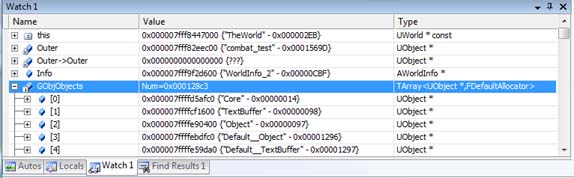
There should also be a small button-bar added to the IDE. If not, right-click on the existing button-bar and expose the "FNameAddin Bar". It looks like this:

The first button brings up the configuration dialog while the second one manually flushes the offset-pointer cache. The config dialog is relatively straight forward:
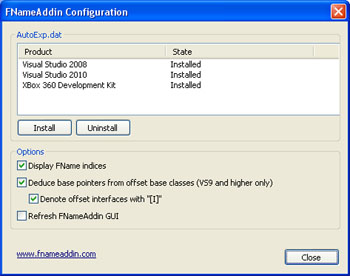
The top section allows you to easily add and remove the add-in's section of the autoexp.dat file. This is most useful when you install a new XDK version or a service pack for visual studio. In both cases, the AutoExp.Dat file is likely to be overwritten. This allows you to easily re-associate the FName type with the add-in's handlers.
The second section in the configuration dialog is for display options.
- Display FName indices: If the index isn't of interest to you, you can reduce your watch window clutter with this option.
- Deduce base pointers from offset base classes: Unreal supports few different ways that a UObject might be involved in multiple inheritance. In these cases, a pointer to one of the secondarily inherited interfaces causes the base pointer to be offset by some number of bytes. Turning this option on will try to deduce what that shift was so the correct UObject base pointer can be found.
- Denote offset interfaces with "[I]": When the previous item is checked, and an offset pointer is detected, the output will be prefixed with "[I]" for "interface".
- Refresh FNameAddin GUI: When checked, the FNameAddin GUI elements registered to Visual Studio are destroyed and recreated.
License & Warranty
Let's keep this easy and informal.
- My work is my own.
- You can use it as much as you want, but you're not allowed to claim it as your own.
- You're also not allowed to redistribute or otherwise profit from my work without permission from me.
- I don't provide any warranties or guarantees for this product.
- I hope you use it in good health, but you definitely use it at your own risk.
Download
Latest: v1.6.3.2
- The add-in can deduce the correct UObject base-pointer from an offset pointer in multiple inheritance cases. (Requires VS2008 or better)
- You can optionally display the FName index as well as if the FName came from an offset pointer.
- Fixed a crash when disabling and re-enabling the add-in while debugging.
- Install and uninstall from the add-in configuration dialog. No more reinstalling the add-in after an XDK update.
- Adds a basic GUI with a logging output pane and a button bar.
- Preferences are preserved between sessions.
Older:
v1.5.8.1
- Found a bad edge case in the page-querying code that could lead to some failed memory queries. This was unlikely to come up for anyone as it would probably require an FName greater than 1k.
- Cut out some needless work being done per-watch item. Should speed things up if only a little.
- Trimmed the installer somewhat. We were copying some useless files around. It was harmless but annoying.
- Tightened up the installer to give some better output on potential failures. I'm assuming everyone's installs have gone swimmingly as I've gotten a grand total of one (1) report of failure. (Sorry about that Zak!)
v1.5.7.0
- Renamed the whole project to FNameAddin.
- If you've installed a previous version, it will be cleaner to uninstall that version before installing this one. This isn't strictly necessary, however.
Donate!
Thanks!
- Irrational Games - Buy BioShock Infinite when it comes out. You know it's going to rock.
- Joe Sola - Thanks for all your help!
- Chris Kline - Thanks for your feedback.
- Everyone who has donated - Your contributions are greatly appreciated
Contact
For questions, praise, and admonishments, I can be reached at FNameAddin (AT) this website dot com.
FAQ:
Q: Who is this for?
A: Games industry programmers working with the Unreal Engine 3. You know who you are.
Q: Why did you write this?
A: I've been working on various UE3-based projects for the last 6+ years. Small helpers like this one accumulate into huge time savings.
Q: Isn't there already a solution for seeing FNames in the watch window?
A: There is, but it doesn't work for Xbox360 development. The existing Win32/Win64 solution works in the general case, but is incapable of the offset base-pointer correction.
Q: But your add-in will allow me to see FNames while debugging on the Xbox360?
A: Yes, it will.
Q: Do I have to make any changes to my Unreal codebase?
A: No. The FNameAddin does not require any code changes in your game project.
Q: Do I have to edit my autoexp.dat files for this to work?
A: No, the installer will do that for you.
Q: Will the add-in allow me to see FNames when I'm debugging a crash dump?
A: Yes it can, but with one caveat. The crash dump must include the full process heap. The smaller "mini dump" option does not include the global FName table.
Q: This seems to be running a bit slower than the last version. What's up with that?
A: The offset base-pointer correction feature is a bit expensive. There is a caching mechanism to try to mitigate this problem, but it can still cause a noticeable lag. Fortunately, if you don't care about this feature and performance if a factor, you can simply disable it in the configuration dialog. If you need it again, it can be re-enabled on the fly without restarting your debugging session.
Q: I have the offset base-pointer correction feature turned on, but it doesn't work for some classes. Why not?
A: Assuming the pointer is otherwise valid, there is an unfortunate edge case in the Visual C++ linker. When this case occurs, the add-in is unable to gather all the information it needs to do the FName look-up. It's something I'm still actively researching, and I suspect it only happens rarely - exactly once in my test data.
Q: I use Epic's free UDK product and I don't have a source code license. Will the FNameAddin help me?
A: Not likely. The add-in is for use with Visual Studio's debugger only.
Q: I've made extensive changes to the core of the Unreal Engine. Will this work for me?
A: Likely, but it depends on the changes. If you've made substantial changes to the core FName or TArray systems, then things may not work out. I've tried to make the add-in resilient to small changes in memory layouts, but that only goes so far. Changes to UObject likely will not hurt anything.
Q: I've made some changes to the Unreal Engine core that are preventing the add-in from working as-is. Can you give me a special version that will work for me?
A: I will happily do that, but it is subject to my normal billing rate for consulting services. Contact me for details.
Q: Is this product endorsed or sanctioned by Epic Games?
A: Not even slightly.
Q: I found a bug! What now?
A: My contact information is above. Please send me as much information as you can.
Copyright © Jason Weiler 2011. All Rights Reserved.